Thursday, March 23, 2017

New Samsung Galaxy S8 Leak Confirms Biggest Feature

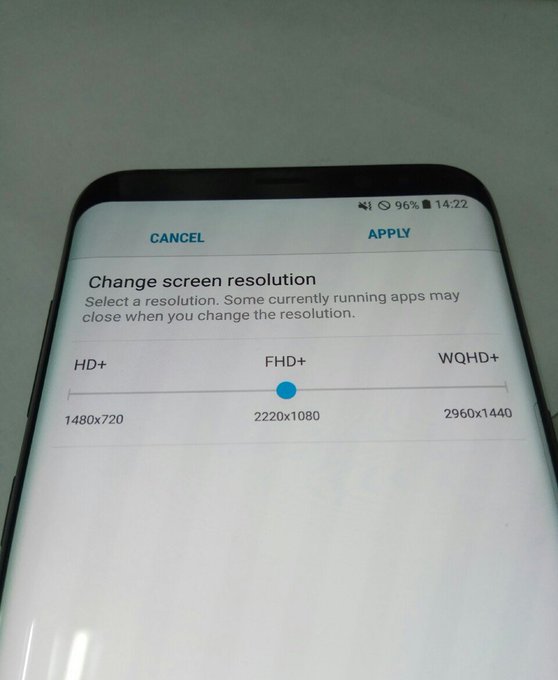
The Samsung Galaxy S8 leaks continue ahead of the full announcement next week. This time there is a photo which suggests that the S8 will have a screen resolution of 2960x1440 and that the phone will employ similar technology to LG G6 to help cut down on power consumption.


Galaxy S8 Change screen resolution

If you haven't looked into the G6 much it's worth knowing that it is able to reduce the amount of pixels the phone renders on the GPU. This means that games can be reduced in either resolution or framerate to save power. This is a useful feature to have, although it will compromise the quality of the image somewhat. Still, if you're on Youtube or playing Pokemon GO it's unlikely to bother you.
What is interesting to me here is that Samsung continues to attempt to compesate for smaller batteries with increasingly intricate methods. But it's understandable, given that users like slim phones and battery technology moves at a glacial pace. Samsung then is forced to drive even more power-hungry phones, and needs clever behind-the-scenes technology to do it. Even so, the rumoured 3000mAh battery in the S8 is lower than LG's G6, which has 3300mAh and will be a similar size and shape. It's also been suggested that the battery vendor for the S8 is, in fact, none other than LG, making the smaller capacity potentially more confusing. The larger S8+, it is rumoured, will have 3500mAh.
It should be pointed out that changing resolutions on Samsung devices isn't new either, you can do it on S7 too. The key information here is that of the screen resolution. 
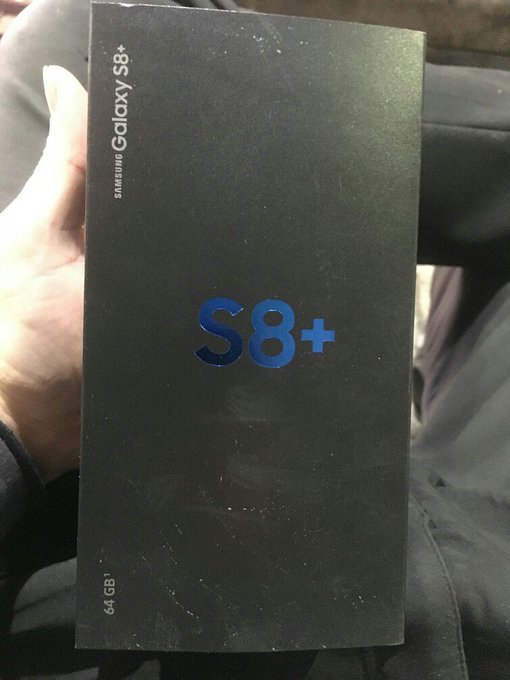
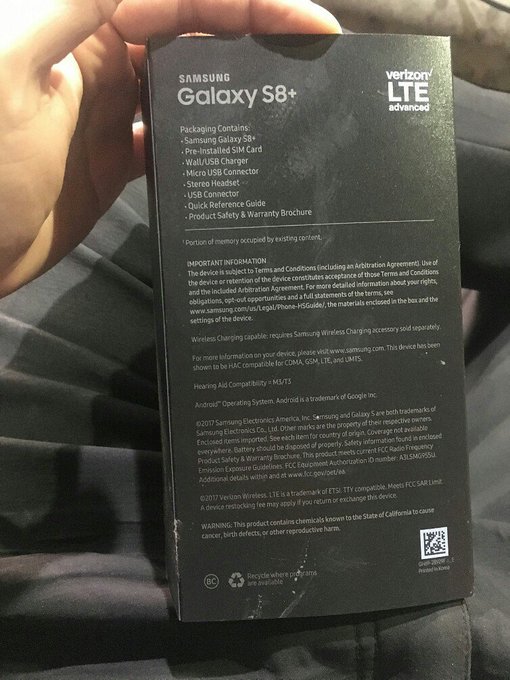
The same users also Tweeted images of S8+ box, which confirmed a few extra details.

View image on TwitterView image on Twitter
wow~

Firstly, this box is for a 64GB phone. No big surprise that this is an option, although we don't yet know what the final storage capacity will be for the phones. It's likely that 64, 128 and 256GB could be on the cards, but don't forget Samsung offers microSD support too.

The one question this leaves, though, is if both these images are from the same source (and that person had the S8+) then do both phones have the same 2960x1440 resolution? Is the S8 a lower resolution than the S8+? I can't see any major problems in either case but it might frustrate some. At this point though we're just days away from Samsung actually telling us all these details, so it's really just a waiting game. 
Share:

Friday, May 20, 2016

How to download Externally on Ios devices

It is known to be that Ios users are unable to download videos or other files from the safari browser due to security purposes, so guess what? a solution would be provided below.


So to be able to download various stuffs on your Ios device, all you need to do is to download SECRET APPS LITE on your device. This could also be used as a vault to hide medias, it is password protected. So for you to download, all you need is to use the apps browser and you are good to go.

Download in the App Store

IF THIS POST WAS HELPFUL KINDLY COMMENT BELOW
Share:

Thursday, May 19, 2016

Google Launches Allo, A 'Smarter' Messaging Platform; Duo, a Video Calling App


A report from yesterday hinted that Google could be looking to hop on board the chatbot bandwagon, in which the end result would be similar to what Facebook has done with their Messenger platform. It seems that the rumors were true because Google has since announced a new messaging platform called Allo.


At its core, Allo is another messaging platform in which users can chat with each other. However Google has placed a lot of emphasis on how the app will allow users to be more expressive thanks to stickers and emojis designed by artists around the world. They have also introduced features like whisper and shout, which basically allows users to determine how big the text size of a reply is.


There is also a built-in image editor that lets users edit images within the app and send it without having to leave the chat. The idea behind it is to ensure that users won't need to keep swapping apps, which brings us to Google Assistant. Allo will come with Google Assistant built into it and will allow users to make restaurant bookings and ask it all kinds of questions, like sports scores updates, trivia, and even play games.


The app will also feature the same smart reply function found in Inbox by Gmail. This allows for quicker replies and the best part is that it will learn your chat habits and over time, it will offer up replies that will sound like it came from you, not via machine learning. The smart reply feature is so smart that it can actually identify photos as well, like a breed of a dog, a dish, and its ingredients.

There is even an incognito mode which ensures that users can keep chats private. There will be end-to-end encryption and messages that are deleted will stay deleted forever. Users can even set messages to expire.

In addition to Allo, Google also announced Duo. This is an accompanying app to Allo and is essentially a video calling app. One of the features of Duo is called Knock Knock. This will show users a live preview of the person calling even before you answer. Google has also emphasized how there will not be a delay between the call and the answering of the call.

Both Allo and Duo will be available on iOS and Android and will be seeing a release this coming summer.

Share:

How To Unroot Your Android Device

Why to unroot Android Phone:
There are plenty of reasons to unroot android phone due to some issues like:


No Warranty: If you don’t know that read it carefully. Yea, rooting your android phone kills its warranty. It does not matter whether your phone is one day old or it is a 2 year old android mobile. So, if you are getting some issues in hardware of your smartphone which is covered in warranty. Then, you must unroot your android mobile before going to Service Centre.
Lack of Security:Yes! You heard it right. There is lack of security in your rooted android phone as the apps to which you have provided root permissions can read or modify anything including your contacts, mails, files, call logs etc. So, if you are uncomfortable with this then you must consider to unroot your android phone. You can check out best antivirus for android to increase security of your android mobile.

Default OS becomes stable: Rooting your android phone sometimes makes it unstable. You may encounter some randoms reboots, random crashes of applications and systems. So, If you are facing such issues then its time to flash stock ROM and unroot it completely.
Method 1 – Unroot your Android phone using SuperSU app
Below, We are sharing best method to unroot android phone easily by one click.

1. First of all, Download and Install SuperSU app from Google Play Store.
2. Go to Settings in SuperSU app.
3. Click on Full Unroot and You are done.
4. Restart your android mobile and Uninstall SuperSU app.
Your phone is unrooted successfully now.

Method 2 – Unroot your android phone using Root Explorer
This method is manual method of removing root files(su, busybox etc.). Try this method only, if abovemethod does not work for you.

First of install Root Explorer in your mobile from Play Store.
1. Open Root Explorer and Grant root permissions to Root Explorer.
2. Now, follow this path – system -> bin.
3. Now, Find two files – su and busybox, Simply delete both of them.
4. Now, Click back button and find app folder.
5. Just, Delete Superuser.app from there.
6. Now, Restart your android phone and your phone must be unrooted now.
Share:

Reasons why your Data get Exhausted than Expected and How To Control it


A lot of times we wonder what is eating up our data most especially smartphone users that subscribe for large amount of data thinking that it would definitely last them for the whole month. So bad, things won’t work that way since they don’t control their mobile data usage.

For people using BlackBerry you are safe from this data leakage issue. Well, the internet blessings didn’t spread to Android OS devices and other smart phones like Lumia and so on.

One of the things that consumes data the most is background services. Which you can actually turn off if you know how. But if you don’t know you'll learn it right now. 

What you didn’t know is that you can actually use less data on android OS devices if you control your data usage. Doing it is easy, let us take for instance if you have 1gig of MTN data. This can last you for a month if you don’t stream online or download large size (in terms of data) applications or run unnecessary updates without checking the newly added features if you really need to carry on with the new version or use what you already have.

Here is how to manage your data usage on an Android device:
• Go to settings
• From the list of all the settings press Data Usage
• Press the option button and check the box that has the text “Restrict background data” beside it.
• With that setting turned on no application will use your data unless you permit it.
• Also you can set limit so when you surf the net to some point that consume much data the device will prompt you to either continue as you have exceed the limit or quit.
• To do that simply check the data limit box from the same Data Usage setting.
Share:

MTN VS AIRTEL DATA PLANS

Recently mtn reduced their cost of data plans to make it affordable by everyone, Unlike before when I myself won't every dream of buying data from mtn when Glo the life saver is there for me (yea like seriously). Hmmm should I include airtel YES and NO yes because their data plan is kinda cheaper/affordable but everybody knows that their rate of zipping data (MB) is too high.
Mtn just lead, the way Airtel is beginning to follow too in terms of data plan subscription airtel also increased their data plan to make it more affordable by almost every using the Internet.


MTN CHEAPEST DATA PLAN vs AIRTEL CHEAPEST DATA 

MTN DAILY DATA PLANS 

30MB - #100 - 104 to 131 - 1Day
100MB - #200 - 113 to 131 - 1Day

WEEKLY DATA PLAN 
700MB - #500 - 103 to 131 - 7 days

MONTHLY DATA PLAN 

1.3GB - #1000 - 106 to 131 - 30Days
3.75GB - #2000 - 110 to 131 - 30Days 
10GB - #5000 - 116 to 131 - 30Days
22GB - #10,000 - 117 to 131 - 30Days
50GB - #20,000 - 118 to 131 - 90Days
85GB - #50,000 - 133 to 131 - 90Days

VS 

AIRTEL DATA PLAN (the newly introduced cheap data plan)

Airtel Introduces New Data Plan Some Will Like It And Some Might Not Like It Heard Some Complaining That The Data Plan That It Exhausts Faster Especially The 1,500 - 3GB 
It's Not Even Up To 1.3GB I Can Testify To That Because Have Subscribed To It Before When I Check My Data Usage After Exhausting The Mb It Was 1.3GB
I Was Very Surprised And Was Nervous But That Doesn't Mean Their Other Data Plans Ain't Good
But The Plan #1,500 - 3GB Exhausts Faster Because It's 1.3GB But Was Just Covered Up With The Digit 3 (GB)

Now Let's Get Back To The Latest Data Plan Subscription And Prices
Dail *141#
Select Buy Data ( 1 )
Select Monthly / Weekly / Daily ( 1 )

MONTHLY DATA PLANS 

4.5GB - #3500 - 30Days ( 1 )
2GB - #2000 - 30Days. ( 2 )

WEEKLY DATA PLANS 

250MB - #500 - 14Days. ( 3 )
50MB - #300 - 1Week. (4)

DAILY DATA PLANS 

25MB - #100 - 5Days. ( 5 )
This Plan Enables You To Get 5Mb Daily For Five Days = 25Mb
50MB - #300 - 3Days. ( 6 )
20MB - #100 - 1Day. ( 7 )

WEEKEND DATA PLANS 

Dial *141#
Select Buy Data ( 1 )
Then Select Time / Weekend
200MB - #200 - Saturday & Sunday
500MB - #500 - Saturday & Sunday


which data plan is cheaper?? And if you where to subscribe which one will go for mtn or airtel???
Share:

How To Use Airtel BIS Plan On Android

I want to share this trick on how to use airtel 1000 Naira for 3GB data on your android devices and laptops

This Airtel 3GB data plan is not like the usual airtel android data plans that use to zap once you activate your data. 

It is worthy to note that the popular glo BIS data plan that most people use to use on their device now


So this trick is timely for those looking for a cheaper way to browse in an official way without the use of any VPN application.


Importance Of Airtel BIS On Android 
==> You don't need any VPN application to power it
==> There is no speed throttling
==> Airtel Network is very fast in most locations in the country
==> It is more affordable than glo blackberry plan on android
==> It doesn’t eat up your data the manner normal Airtel Android plan does
==> It is very simple to activate
==> Airtel Blackberry plan is official.

Things Required
==> Blackberry 10 IMEI
==> Ability to tweak IMEI
==> Activation of the plan

How To Tweak Blackberry 10 IMEI To Enjoy Airtel Blackberry Plan On Android

It is very simple and if you have been using glo BISon android, this trick will be too familiar to you. 
Firstly All you need to do is to tweak this Blackberry 10 IMEI
356760051192***
and add any three digit of your choice to it in other to complete it to 15 digits.

Normally, once you add the last three digits, the IMEI should be complete and valid but to make sure it is really valid, use IMEI analyzer to validate it.


How To Activate Airtel Blackberry Plan Of 3GB For N1000
After changing your imei and enabling flight mode then deactivate Flight Mode
==> Dial this code *431# to subscribe to airtel blackberry data plan of 3gb
==> Phone APN should be internet.ng.airtel.com
==> To check your airtel data balance, dial *140#

How Do I Use It On PC
Its very simple, once you have activated it on your android device, and it starts browsing, just tether it via hotspot with your PC or any other device. You can also use USB chord to connect it.

Are you still confused? Ask your question using the comments box below and i will try my best to guide you properly.

Share:
Powered by Blogger.

Recent Posts

Unordered List

Pages

Theme Support